
Withdraw Money from Pak365 Game Using JazzCash & Easypaisa [2026]
Pak365 Game App is a gaming platform that offers real PKR money. Players can play a variety of games on this app and earn real cash. Moreover, players can withdraw money from Pak365 in JazzCash, Easypaisa, and Bank accounts. The complete guide to withdrawing money from Pak365, with all related information, is provided below.
Overview of Pak365 Withdrawals
- Withdrawals are safe, secure, and fast.
- You must verify your account before withdrawals.
- Available payment methods are JazzCash, Easypaisa, and Bank Transfers.
- Payment processing usually takes 5 seconds to 30 min.
- Minimum amount for a withdrawal is Rs. 100.
Requirements to Withdraw Money from Pak365
Please ensure the following requirements and conditions before withdrawing money from your Pak 365 Game wallet:
- Ensure you have the login details of the respective account.
- Ensure you have an active JazzCash/Easypaisa/bank account.
- You have a minimum required withdrawal amount.
- The daily withdrawal limits of the withdrawal account must not be exceeded.
Available Payment Methods for Withdrawal on Pak365
You can withdraw your money using the following methods:
- JazzCash: Quick and secure cash withdrawal method.
- Easypaisa: Offers fast withdrawals within seconds.
- Bank Transfer: Any Pakistani bank, including UBL, HBL, ABL, MCB, etc.
How to Withdraw Money from Pak365 – Full Step-by-Step Guide
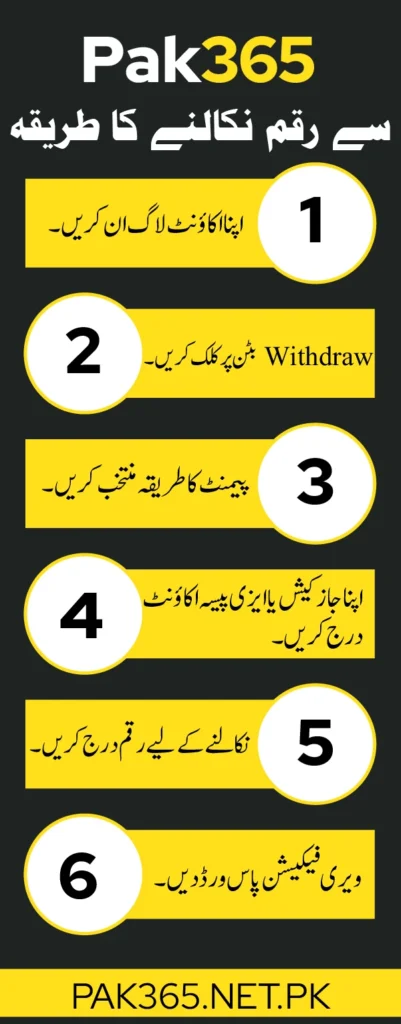
Withdrawing money from Pak 365 is simple and secure. Players can withdraw their earnings from the app in seconds. Follow these steps to withdraw:
01. Log in to Pak365
- Launch the installed app or visit the login page by clicking the button above.
- Go to the login section.
- Provide your registered login details and log in.
02. Go to the Withdrawal Section
- After logging in, click the “Member” icon in the bottom menu.
- Click “Withdrawal” to go to the withdrawal section.
03. Select Withdrawal Method
- You can withdraw money in E-Wallets (JazzCash & Easypaisa) or Bank Accounts.
- Select the “E-Wallet” or “Bank Account” section.
04. Add Withdrawal Account
- Click on the “Add” or “+” button.
- Enter your withdrawal account title and number.
- Set a transaction password for the security of your funds.
- Re-enter the password for verification
- Click “Submit” to add your withdrawal account.
05. Enter Withdrawal Amount
- After adding or selecting the withdrawal account, enter the withdrawal amount.
06. Verify the Withdrawal
- Enter the transaction password you have set for security.
- Click “Submit” to verify your withdrawal.
- The withdrawal amount will be credited to your withdrawal account.
07. Check Your Withdrawal/Balance
- Go to your withdrawal wallet and confirm your withdrawal.
Withdrawal Limits on Pak365 Game
Below are the daily deposit limits of the available payment methods on Pak365.
| Payment Methods | Minimum Withdrawal Limit | Maximum Withdrawal Limit |
| JazzCash | Rs. 100 | Rs. 50,000 |
| Easypaisa | Rs. 100 | Rs. 50,000 |
| Bank Transfers | Rs. 100 | Rs. 49,999 |
What is the Pak365 Withdrawal Time?
Your withdrawal amount is usually credited to your account within a few seconds. However, it may take 5-30 minutes. During peak hours, the withdrawal may take up to 24 hours to complete. If it takes more time or the withdrawal fails, please contact the support team immediately.
Safety Tips for a Secure and Successful Withdrawal
- Please use the official Pak365 app or website for withdrawal.
- Always use your personal withdrawal account.
- Never share your transaction password with everyone.
- Review your withdrawal details for a successful withdrawal.
- Test with a small withdrawal first before withdrawing a large amount.
- Check your withdrawal amount and withdrawal account limit before a withdrawal.
- Don’t change or take withdrawals from multiple accounts for smooth withdrawals.
- Always take a screenshot of a successful withdrawal.
- Contact the support team immediately if a withdrawal fails.
How to Contact Support if a Withdrawal Failed?
When a withdrawal fails, please contact the support team by following the process below:
- Log in with the same account on which the withdrawal failed.
- Select “Member” in the bottom menu bar.
- Click the “Customer Support” icon.
- Select your mode of contact, e.g., Telegram or Live Support.
- After contacting the support team, describe your problem.
- Share your successful withdrawal receipt (screenshot) as proof.
- Your issue will be solved within 24 hours.
Common Withdrawal Problems & Fixes
01. Withdraw Not Received
Check if your withdrawal is pending. If pending
- Please wait for a few minutes. It could take time during peak hours.
- Avoid multiple withdrawal requests.
02. Withdrawal Failed
- Ensure your withdrawal account details are correct.
- Ensure withdrawal limits are not exceeded.
- Contact the Support Team with the payment receipt.